2.Navigate to My Services Once you're logged in to the 'Client Area', click on the 'Services' menu, and then select 'My Services'. This section will display your hosting account details and status. To proceed, click the 'Active' button.


Access DomainIndia.com's Client Area Navigate to the DomainIndia.com homepage and click on the 'Client Area' menu option. Enter the email address and password you used during account registration, then click 'Login'. If you've forgotten your password, click the "Forgotten your password?" link to reset it.
2.Navigate to My Services Once you're logged in to the 'Client Area', click on the 'Services' menu, and then select 'My Services'. This section will display your hosting account details and status. To proceed, click the 'Active' button.


Alternative cPanel Login Method:
If your domain name is already pointing to the correct nameservers, you can also log in to cPanel using your domain name. For example: http://www.yourdomainname.com/cpanel
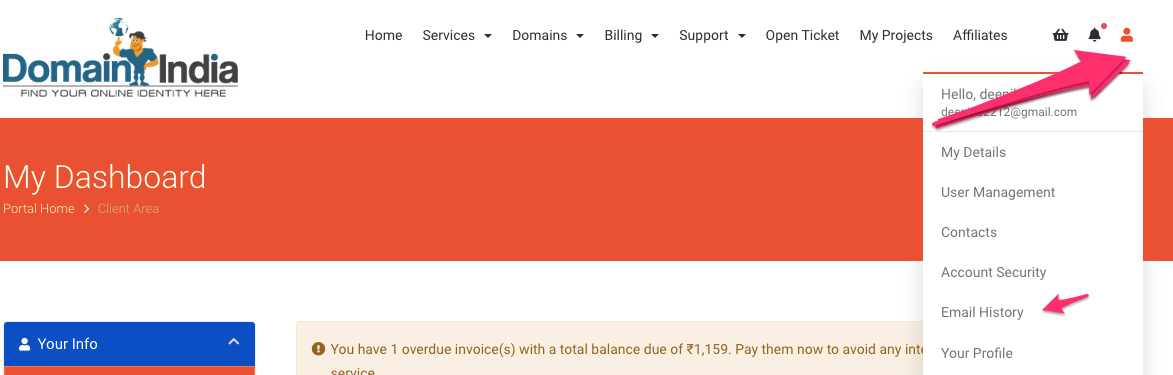
You can find your cPanel username and password in the welcome email sent by Domain India. To access a copy of all emails received from Domain India, follow these steps:
Log in to your Domain India client area. After logging in, you'll see your name in the top right corner of the client area.
Click on "Email History" to access a list of your received emails, including your "New Account Information Email" containing details about your hosting account.
If you're unable to locate the correct login information or need assistance, please contact Domain India via phone, live chat, or email at support@domainindia.com